Hi guys,
I just started designing my own models and would like to make crease patterns and rough diagrams just to have on record (and maybe to use for something more someday)! I downloaded inkspace as i really have no budget and i heard its pretty decent. However, i have no idea how to use it. Can anyone give me a brief idea on how to draw lines according to angles and other conditions? I would greatly appreciate it.
Thanks!
Inkscape Info
Forum rules
READ: The Origami Forum Rules & Regulations
READ: The Origami Forum Rules & Regulations

Re: Inkscape Info
What I do is scan in my cp that I drew on the unfolded base then import it and embed it then trace the lines and delete the picture
-
eric_son

- Senior Member
- Posts: 256
- Joined: July 10th, 2006, 11:44 am
- Location: Quezon City, Philippines
- Contact:
Re: Inkscape Info
You can also try using Oripa to draw your Crease Pattern.
It provides all the useful functions you mentioned.
You can tell it to draw lines using a specific angle.
You can also tell it to draw a line that bisects an angle, etc.
The only downside is it does not have function to export your CP as a bitmap or SVG.
It provides all the useful functions you mentioned.
You can tell it to draw lines using a specific angle.
You can also tell it to draw a line that bisects an angle, etc.
The only downside is it does not have function to export your CP as a bitmap or SVG.
I also do card models -- http://cutfoldpaste.blogspot.com
-
joshuaorigami

- Buddha
- Posts: 2344
- Joined: April 26th, 2010, 6:35 pm
Re: Inkscape Info
I made a topic you might find helpful.
viewtopic.php?t=7765&highlight=starter
viewtopic.php?t=7765&highlight=starter
my diagrams page http://snkhan.co.uk/forum/viewtopic.php?t=7177
my flickr gallery http://www.flickr.com/photos/52731923@N04/
my flickr gallery http://www.flickr.com/photos/52731923@N04/

Re: Inkscape Info
I'll quickly describe how I do it:
with shift+ctrl+m you can open the transformation menu. there is a tab for turning. Just insert the angle you need and you should be fine.
with shift+ctrl+m you can open the transformation menu. there is a tab for turning. Just insert the angle you need and you should be fine.
My Homepage http://www.tavinsorigami.com
-
cjbnc
- Junior Member
- Posts: 75
- Joined: December 21st, 2010, 1:19 am
- Location: North Carolina
- Contact:
Re: Inkscape Info
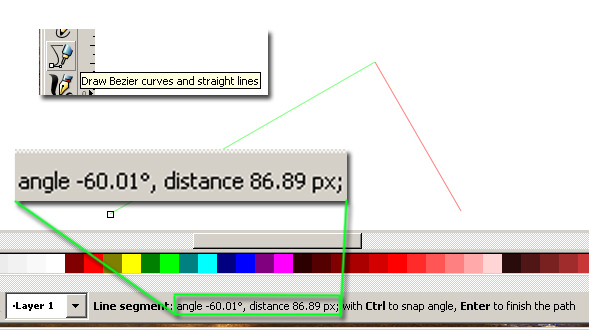
I use the line segments tool as shown above. While drawing a new segment (the red segment in the example) the toolbar at the bottom of the screen shows the current length and angle. If you hold the Ctrl key while moving the cursor, it will snap to angles in multiples of 15 degrees. Not sure if you can set that to 22.5 or something else instead.
My Flickr: http://flickr.com/photos/cjbnc
-
Brimstone

- Buddha
- Posts: 1729
- Joined: November 23rd, 2004, 3:59 am
- Location: Colombia, South America
- Contact:
Re: Inkscape Info
I am no expert, but I'll give you the basics:
The program starts and shows a rectangle, it is your sheet on where to draw. It doesn't mean you can't draw outside of it, but it helps for reference.
With shift 3 you toggle the grid, it helps a lot. You can activate and desactivate "snap to grid" which is a function that only allows lines to start and end on the grid intersections. Shift Ctrl D allows you to change distances, origin, etc.
If you click on a line and choose the menu Object and then the option "Fill and Stroke", it opens a menu that lets you change the color, the width and the style of the lines.
The program starts and shows a rectangle, it is your sheet on where to draw. It doesn't mean you can't draw outside of it, but it helps for reference.
With shift 3 you toggle the grid, it helps a lot. You can activate and desactivate "snap to grid" which is a function that only allows lines to start and end on the grid intersections. Shift Ctrl D allows you to change distances, origin, etc.
If you click on a line and choose the menu Object and then the option "Fill and Stroke", it opens a menu that lets you change the color, the width and the style of the lines.