Page 1 of 2

Diagramming Pay

Posted: August 6th, 2011, 12:18 am
by Black~Terror
Currently, I am diagramming models for someone, and I get paid for it. We agreed that if I diagram one of his models, I get paid $15, $20 dollars for harder diagrams.

Thing is, I dunno if $15 dollars is a reasonable price per diagram... either too little or too expensive...

Do you know what is a good price for doing diagrams for someone? I am having difficulty settling on a reasonable price.

Thanks.

Re: Diagramming Pay

Posted: August 6th, 2011, 1:21 am
by Arnold K
calculate how many hours you spend doing it, and see how much money you make per hour. If he/she is publishing these diagrams with the purpose of making some money, then you shouldnt feel bad for asking for more.

Re: Diagramming Pay

Posted: August 6th, 2011, 1:35 am
by Black~Terror
It took me 8 hours to do the first and only diagram that he requested. It only had 21 steps, but I only took that long because I have little experience diagramming.

15/8= < $2 per hour

Re: Diagramming Pay

Posted: August 6th, 2011, 2:02 am
by orislater
why do you care if its too expensive? :evil: haha well it depends on how hard diagramming is for you. if its HARD not time consuming HARD then it should cost more

Re: Diagramming Pay

Posted: August 6th, 2011, 2:37 am
by Black~Terror
@orislater -

It's not challenging for me to diagram, but it does take me a long time to diagram due to, as I've said, lack of experience.

In terms of "HARD" parts, all I can say is that there was one part that was difficult to diagram, but that's about it. There were only 21 steps.

Re: Diagramming Pay

Posted: August 6th, 2011, 3:35 am
by Jonnycakes
I think you are getting stiffed. Diagramming is highly skilled labor (depending on the quality and intricacy of the finished diagrams), and takes a very long time. I understand not wanting to charge hourly since you are still learning and some of the time spent is due to lack of experience, but $15 per diagram is ridiculously cheap. I think it is silly to price by number of diagrams completed, since each one is incredibly different. Charging by how in-depth the diagram is on a case-by-case basis makes more sense to me. Ultimately, charge what you think your time and effort is worth.

Re: Diagramming Pay

Posted: August 6th, 2011, 5:09 am
by Black~Terror
@Jon - I only said 21 steps for informational purposes, not because I was implying I charge based on amount of diagrams... I think amount of time/effort spent on the diagrams are more important.

Now don't get the wrong idea; the person in question's a nice guy.
However, he doesn't want to charge much because he doesn't have a lot of money, and he also knows a person who diagrams for free but takes a lot of time...

I just want to find a way to get a solid solution so that both me and him don't feel ripped off.

Re: Diagramming Pay

Posted: August 6th, 2011, 12:15 pm
by HankSimon
I think it works both ways. If you feel that your work is appreciated, and you don't feel exploited, then $15 sounds fine... considering that someone is paying you to learn (and we don't know the quality of your work or how much creativity you have to put into designing the diagrams vs. digitizing someone's drawings).

However, as your experience and quality improve, your speed will improve, so you might choose to charge more, as Jonnycakes suggests, because it is a unique skill. Don't price yourself out of a 'job' that you enjoy.

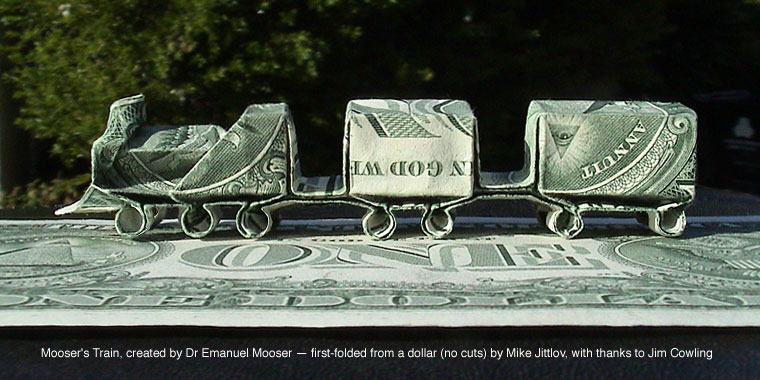
If you do work for hire, and can get permission, I've always wanted diagrams for Mike Jittlov's dollar train:
http://www.wizworld.com/moneygami/money ... _train.jpg

Re: Diagramming Pay

Posted: August 6th, 2011, 4:17 pm
by Black~Terror
@Hank -

"considering that someone is paying you to learn"

I don't think he intended me to "pay to learn"; he saw one of my own diagrams and liked it a lot that he asked me to do some diagrams of his models for him.

And that train, to my knowledge, is a box-pleated model. The CP to the model is in Lang's ODS... and the original author is Emmanuel Mooser, and the train is named after him.

EDIT: For curiousity's sake, here's what my diagramming style is...

Image

Re: Diagramming Pay

Posted: August 6th, 2011, 4:34 pm
by Jonnycakes
Sorry, Black~Terror, I didn't mean to sound like I was offending your client. I just wanted to give my opinion on how much you should charge. I think Hank said it best:
HankSimon wrote:If you feel that your work is appreciated, and you don't feel exploited, then $15 sounds fine.

Re: Diagramming Pay

Posted: August 6th, 2011, 4:37 pm
by Black~Terror
Jonnycakes wrote:Sorry, Black~Terror, I didn't mean to sound like I was offending your client. I just wanted to give my opinion on how much you should charge. I think Hank said it best:
Haha I didn't take it as an offense; it was your opinion and I respect it.

Re: Diagramming Pay

Posted: August 6th, 2011, 7:00 pm
by HankSimon
Does that mean I can put in my opinion, too ?
1. Your illustrations look clear, sharp, and easy to follow. Don't change this one - for the next one:
2. I prefer the Left to Right style of flow, instead of the continuous flow... my opinion... and it probably is a less efficient use of paper, but I think it is a little easier to follow.
3. If you have control over the color and the dashes, then a lighter grey provides better contrast. A slightly larger line with twice the space might be easier to see. And a serif font, like Times would be easier to read.
4. I agree with your customer - I like your style.

The Mooser Train is Box-Pleated (The most famous first example) in ODS. And it does use a CP with no diagrams. I have folded it, badly, and taught it. Jittlov's train is mostly the same, with mods to the locomotive and the proportions... altho many folks have folded it successfully - 'simple reverse engineering' (?), I am not one of them ... and I think diagrams would help.

Re: Diagramming Pay

Posted: August 6th, 2011, 7:31 pm
by Black~Terror
HankSimon wrote:Does that mean I can put in my opinion, too ?
1. Your illustrations look clear, sharp, and easy to follow. Don't change this one - for the next one:
2. I prefer the Left to Right style of flow, instead of the continuous flow... my opinion... and it probably is a less efficient use of paper, but I think it is a little easier to follow.
3. If you have control over the color and the dashes, then a lighter grey provides better contrast. A slightly larger line with twice the space might be easier to see. And a serif font, like Times would be easier to read.
4. I agree with your customer - I like your style.
Uh, yeah, you can post your opinion, tho when I said opinion, I was referring to people's thoughts about the pay. xD

1. Thanks.
2. For the person's diagram, I did it left to right rather than the continuous flow one. For my own diagrams, I personally like continuous better, but hey that's just me.
3. For the font, I like fonts that are more stylish than standard fonts(obviously not too stylish), but I guess clarity is more important than it looking eye-pleasing haha. Don't worry, I gave the person's diagram a more clearer font. As for color, if you mean the color of the paper, then I dunno about that, because if I choose a lighter grey, then the crease lines may be hard to see...
Paper color - 40% grey
Crease line color - 20% grey
As for lines... if it's the valley fold lines, then yeah... I think it could be improved a little... =P

Thanks for your thoughts.


And fyi, I already gave the completed diagram of his models to him and got $15 on Friday. And the picture shown is not the diagram he asked me to complete; it is my own diagram I made for one of my own models.

Re: Diagramming Pay

Posted: August 6th, 2011, 7:51 pm
by dinogami
1. Your illustrations look clear, sharp, and easy to follow.
Agreed, they are quite clear...but they look flat and two-dimensional. Try either (or both) (a) adding some shading in relevant places to suggest three-dimensionality, or (b) emphasizing underlying layers by making them slightly offset from the overlying ones--it looks like you've tried this on the two stretched flaps in the middle of the model, and how they connect to the rest of the model on the top and bottom of each diagram, but I can't zoom in clearly enough to tell for sure. I also recommend making the existing crease lines thinner, but the idea of making them a lighter shade on the darker background is a good one! In a few places (the minority, to be sure), the existing crease lines look like they go all the way to the edge of the model, which of course they should not.
2. I prefer the Left to Right style of flow, instead of the continuous flow... my opinion... and it probably is a less efficient use of paper, but I think it is a little easier to follow.
As a general rule, I agree with this; I don't usually like the "follow the yellow brick road" approach, but of course with some models and diagrams, using a grid-like layout is the only way to pack a larger number of diagrams onto a single page. If you must use the "follow the yellow brick road" approach, I recommend making the step numbers much larger and easier to see at a glance--try divorcing them from the text instructions from each step and moving them to the upper left of their associated diagrams.
A slightly larger line with twice the space might be easier to see. And a serif font, like Times would be easier to read.
I don't know what you mean by the line and space thing, but I disagree about the serif font. Standard practice in graphic design, as I understand it, is that sans-serif fonts are easier to read than serif fonts, especially at small sizes. Of course, this depends on the font, too--I'd agree that Times New Roman is easier to read than, say, Echo, or even Bordeaux Heavy, but simple sans-serif fonts, such as Arial, Gill Sans, Tahoma, Eras, etc. are the cleanest, easiest-to-read fonts. Boring because they're overused, to be sure, but clean and easy!

On a tangential note--and this is not necessarily something that you should change in your diagrams--I've never understood why some steps are given sequential numbers in diagrams when no action happens between them. For example, in steps 22-23 of your diagrams, nothing is happening in the model. Yet the model now appears to be one step longer than it needs to. Granted, this is common practice in diagramming, but I've never understood it. I could diagram making the traditional crane, showing the model at different magnifications, from different angles, etc., and make it a 100+ "step" model. But different magnifications and views aren't steps; they are different aspects of a single step. There are at least a couple of workarounds for this:

(1) using letter suffixes that provide an additional means of informing the reader that two sets of diagrams are related but not necessarily different. For example, instead of 22-23 in your diagrams, make them 22a and 22b.

(2) Don't number intermediate steps at all. Interestingly, you've done something similar with your step 29--just providing one label, and one step number, to two (or more) different diagrams that show two (or more) different views.

Either one is fine, really, but you've got two different methods going on: how you did step 29 is inconsistent with how you did steps 22-23. This won't confuse any readers or followers of the diagrams, but it does come across as a tad sloppy, as well as not giving an appropriate number of steps for the finished model. (But for that matter, I've never gotten a good handle on whether or not people include a single diagrammed step that says "Repeat steps 18-63 on the other side." as one step in the finished model or 45 steps!)

For whatever it's worth, here's the diagrams I whipped up for the Prehistorigami exhibit on how to fold the traditional crane. This aren't actually the final version, but one I came up with in the process of trying to avoid reverse folds (for some reason, those seem really unclear to novices), so there are more steps in these diagrams than one might expect to see in "real" origami diagrams, but I didn't number the "intermediate" steps. I also could have added a tad more shading to some of them to indicate where some layers go beneath others, but didn't for the sake of expediency (deadline was approaching!).

Image

(larger view here)

I'm not saying these diagrams are perfect; merely providing a point of comparison!

Re: Diagramming Pay

Posted: August 6th, 2011, 9:28 pm
by Black~Terror
Agreed, they are quite clear...but they look flat and two-dimensional. Try either (or both) (a) adding some shading in relevant places to suggest three-dimensionality, or (b) emphasizing underlying layers by making them slightly offset from the overlying ones--it looks like you've tried this on the two stretched flaps in the middle of the model, and how they connect to the rest of the model on the top and bottom of each diagram, but I can't zoom in clearly enough to tell for sure. I also recommend making the existing crease lines thinner, but the idea of making them a lighter shade on the darker background is a good one! In a few places (the minority, to be sure), the existing crease lines look like they go all the way to the edge of the model, which of course they should not.
Hmm... I see... except where can I shade? The diagrams shown all are "supposed" to be flat, and shading's for if the model's 3-D, right?

I'll try to incorporate it in, once I know how to add gradients in Inkscape. And rest assured the rest of the diagrams has its fair share of offset layers. ; )
On a tangential note--and this is not necessarily something that you should change in your diagrams--I've never understood why some steps are given sequential numbers in diagrams when no action happens between them. For example, in steps 22-23 of your diagrams, nothing is happening in the model. Yet the model now appears to be one step longer than it needs to. Granted, this is common practice in diagramming, but I've never understood it. I could diagram making the traditional crane, showing the model at different magnifications, from different angles, etc., and make it a 100+ "step" model. But different magnifications and views aren't steps; they are different aspects of a single step. There are at least a couple of workarounds for this:

(1) using letter suffixes that provide an additional means of informing the reader that two sets of diagrams are related but not necessarily different. For example, instead of 22-23 in your diagrams, make them 22a and 22b.

(2) Don't number intermediate steps at all. Interestingly, you've done something similar with your step 29--just providing one label, and one step number, to two (or more) different diagrams that show two (or more) different views.

Either one is fine, really, but you've got two different methods going on: how you did step 29 is inconsistent with how you did steps 22-23. This won't confuse any readers or followers of the diagrams, but it does come across as a tad sloppy, as well as not giving an appropriate number of steps for the finished model. (But for that matter, I've never gotten a good handle on whether or not people include a single diagrammed step that says "Repeat steps 18-63 on the other side." as one step in the finished model or 45 steps!)
Believe it or not, the bottommost diagram in my "yellow brick road" sample is actually supposed to be step 30. It got cut off when I scanned the image.

And me making zoom outs separate steps is just my style... and I have a reason for doing so. I think it's necessary to show the current model before doing anything else to it. If I omit the diagram and the folder has realized he or she folded something wrong, then it might be too late for the folder to correct it (or at least tedious to fix). This is especially apparent when turning the model over as well.

But yeah, you have a point about steps 23 and 29 being inconsistent.
Don’t leave the reader dangling

One of the greatest cruelties a diagrammer can perpetrate upon the reader is illustrated by the
following scenario. In step 113, we are instructed to perform an exceedingly complicated series of
closed sinks and to turn the paper over. Step 114, therefore, shows the opposite side of the model. The
paper does not get turned back over until step 243, at which point we discover we folded step 113 all
wrong, but it’s too late now. Always show the result of any procedure immediately.

This seems like an easy scenario to avoid, but there is actually a very good reason why it happens all
the time. Drawing diagrams is tedious and hard work, and it seems like a great waste of time to draw a
step in which nothing happens. The diagrammer must realize, however, that his goal is to make things
as easy as possible for the reader, not for himself (painful though that may be).
Link: http://www.langorigami.com/info/diagramming_series.pdf
Page 4

And I will say again for future reference, just in case you guys haven't saw it yet, I already gave the completed diagram of his model to him and got $15 on Friday.

And the picture shown is not the diagram he asked me to complete; it is my own diagram I made for one of my own models. The client's diagrams were made differently from my own style.
I still will accept everyone's suggestions, however.