Page 1 of 2
Making This Effect with Gimp?
Posted: August 14th, 2011, 9:50 pm
by Lephantome92
I have been searching and trying for *days* to make this effect, with absolutely no luck. Any suggestions?

Re: Making This Effect with Gimp?
Posted: August 14th, 2011, 10:00 pm
by Ondrej.Cibulka
What effect??
Re: Making This Effect with Gimp?
Posted: August 14th, 2011, 10:23 pm
by Lephantome92
sorry for the tiny image. here
http://www.imgbase.info/images/safe-wal ... okemon.jpg
I'm trying to make myself some wallpapers, and this image is too big to display here. even the smallest i could find was too big (800x600 px)
the way that it seems to be, not totally sure how to describe it, but almost like it's drawn with light. I've tried for hours with google and gimp to make that effect, but to no avail.
Re: Making This Effect with Gimp?
Posted: August 14th, 2011, 11:21 pm
by Axel´s Origami
I thing 4chan has a forum about artwork, ask there.
They probably know.
Re: Making This Effect with Gimp?
Posted: August 15th, 2011, 1:47 am
by Lephantome92
i actually got most of the backgrounds from there, there was a whole page dedicated to pokemon wallpapers like that. 4chan. good, but sometimes bad. imma see if they have anything there, though
Re: Making This Effect with Gimp?
Posted: August 15th, 2011, 3:23 am
by Lephantome92
well, 4chan lead to something, which, because i have GIMP, lead to something else, which led to completion!! I started on a Ditto, now to something else
Re: Making This Effect with Gimp?
Posted: August 15th, 2011, 4:10 am
by Lephantome92
Re: Making This Effect with Gimp?
Posted: August 15th, 2011, 2:43 pm
by Falcifer
The effect is a filter called Fractalius (or something similar). There's a plug-in for Photoshop, which is what it started as. I'm sure that someone had made a similar plug-in for the GIMP, but I don't imagine it will be quite as good, but "Fractalius" is the thing to search for.
Re: Making This Effect with Gimp?
Posted: August 15th, 2011, 3:25 pm
by Lephantome92
lol thanks for helping, but when browsing :shudders: 4chan, i managed to find it, but i don't have the money to get photoshop+fractalius, and haven't had much luck w/ finding it for GIMP. ill try again for GIMP.
haha btw, using the same method I did with that, then merging all the layers, and finally messing with brightness and contrast, I managed to get the yellow parts on giratina to look golden!!
Re: Making This Effect with Gimp?
Posted: October 23rd, 2011, 11:25 am
by jeko
you don't need to buy photoshop in order to use photoshop plugins. Many other programs support the same type of plugins, e.g. Paint.NET with PSFilterPdn are a free alternative.
Re: Making This Effect with Gimp?
Posted: October 23rd, 2011, 3:31 pm
by Lephantome92
thanks jeko! I never thought of searching non-gimp free programs that are purdy much photoshop!
EDIT: I just found out about a new GIMP effect called Rodilius, which seems to do almost the same as Fractalius. It doesn't curve the lines, but it makes the image look like it's "painted with light". sorry the images are too big, I'm making sweet pokemon desktop backgrounds, so I think 1,366x768 pixels is a tad big!!
Re: Making This Effect with Gimp?
Posted: October 27th, 2011, 2:08 am
by orislater
4chan: internet superheroes haha oh and btw cool background! you should make some origami pictures look like that

Re: Making This Effect with Gimp?
Posted: October 27th, 2011, 4:01 am
by Lephantome92
lol but then you couldnt really see the good details!! wait a sec, ill look for a small pic and edit it. brb
EDIT:
Ok, I didn't fold this particular one, but all the pics i have of mine are crap.
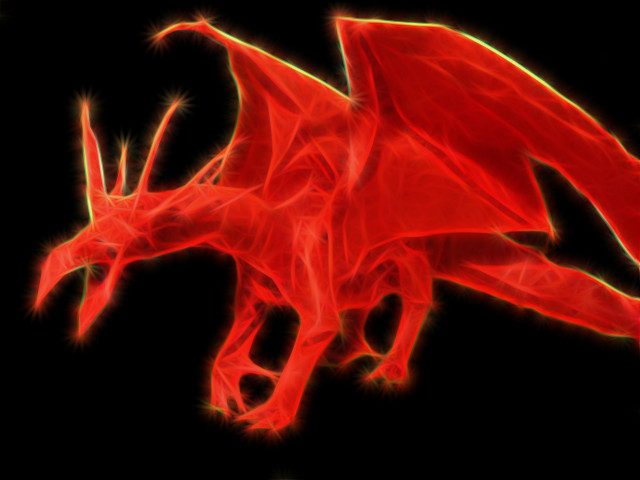
While doing it to origami is cooler than i thought it would be, i doubt I'll do it a lot. Rodilius (the GIMP equivalent of Fractalius) works best w/ a dark background, and i couldn't erase to clear, so i had ta go in and pain most of the rest black.
Re: Making This Effect with Gimp?
Posted: November 12th, 2011, 5:11 pm
by Jakeplusplus
How do you get rodilus on ?
Re: Making This Effect with Gimp?
Posted: November 12th, 2011, 11:19 pm
by Lephantome92
Jakeplusplus wrote:How do you get rodilus on ?
Go to
this website, and download and install G'MIC (Grey's Magic Image Converter) into the same file as GIMP. It has better directions on the site.
