Diagramming
Forum rules
READ: The Origami Forum Rules & Regulations
READ: The Origami Forum Rules & Regulations
-
bnm70

- Junior Member
- Posts: 108
- Joined: March 15th, 2012, 2:29 pm
- Location: somewhere with a piece of white paper
- Contact:
Diagramming
How do I diagram my models with a mac Osx 10.7.5
Origami is like food. You can love it and be obese. Or you can hate it and be and be a"cute". Or you can be a fail and your just that. A fail. Flickr : http://www.flickr.com/photos/76647015@N08/?saved=1
-
origamiguy

- Super Member
- Posts: 144
- Joined: March 23rd, 2006, 8:13 pm
- Location: Indianapolis, Indiana, USA
- Contact:
Re: Diagramming
Look at this topic:
viewtopic.php?f=12&t=4884&hilit=diagramming
viewtopic.php?f=12&t=4884&hilit=diagramming
-
bnm70
- Junior Member
- Posts: 108
- Joined: March 15th, 2012, 2:29 pm
- Location: somewhere with a piece of white paper
- Contact:
Re: Diagramming
I did.. All for Windows or snow leopard
Origami is like food. You can love it and be obese. Or you can hate it and be and be a"cute". Or you can be a fail and your just that. A fail. Flickr : http://www.flickr.com/photos/76647015@N08/?saved=1
-
origamiguy
- Super Member
- Posts: 144
- Joined: March 23rd, 2006, 8:13 pm
- Location: Indianapolis, Indiana, USA
- Contact:
Re: Diagramming
If you are just doing one off diagrams and not doing a book, use Inkscape. If you are going to do a book then I suggest you pay for a more robust vector drawing program, like Adobe IlLustrator. A bit pricey, but you may be able to get a discount student version.
I have so far chosen to remain on OS X 10.6 so I can continue to use FreeHand. I have done a diagram or two in Inkscape, but it does not allow global line style changes. So be sure you have the line style you want when diagramming, because if you want to change it in Inkscape, you have to go in and select them all to do the style change. If you are in FreeHand or Illustrator, you jut choose the line style, change the line style and it will apply to all lines in the document. A huge timesaver for changing line styles.
I have so far chosen to remain on OS X 10.6 so I can continue to use FreeHand. I have done a diagram or two in Inkscape, but it does not allow global line style changes. So be sure you have the line style you want when diagramming, because if you want to change it in Inkscape, you have to go in and select them all to do the style change. If you are in FreeHand or Illustrator, you jut choose the line style, change the line style and it will apply to all lines in the document. A huge timesaver for changing line styles.
-
bnm70
- Junior Member
- Posts: 108
- Joined: March 15th, 2012, 2:29 pm
- Location: somewhere with a piece of white paper
- Contact:
Re: Diagramming
Inkscape is only for Leopard..
Origami is like food. You can love it and be obese. Or you can hate it and be and be a"cute". Or you can be a fail and your just that. A fail. Flickr : http://www.flickr.com/photos/76647015@N08/?saved=1

Re: Diagramming
Have you tried installing Inkscape? I don't own a Mac but:
http://en.dev.inkscape.org/download/
has a download link for Lion
http://wiki.inkscape.org/wiki/index.php ... g_Inkscape
http://en.dev.inkscape.org/download/
has a download link for Lion
http://wiki.inkscape.org/wiki/index.php ... g_Inkscape
For Lion (10.7.x)
Everything is ok.
-
Dybkjær
- Newbie
- Posts: 11
- Joined: October 19th, 2008, 10:18 pm
- Location: Copenhagen, Denmark
- Contact:
Re: Diagramming
I am using Inkscape on MacBook Air running 10.7.3. Works fine.
Hans Dybkjær
papirfoldning.dk
papirfoldning.dk
-
Dybkjær
- Newbie
- Posts: 11
- Joined: October 19th, 2008, 10:18 pm
- Location: Copenhagen, Denmark
- Contact:
Re: Diagramming
I am using Inkscape on MacBook Air running 10.7.3. Works fine.
Hans Dybkjær
papirfoldning.dk
papirfoldning.dk
-
GWB origami

- Forum Sensei
- Posts: 836
- Joined: February 12th, 2012, 9:20 pm
- Location: somewhere in the evil netherworld riding a giant, three headed tarantula
- Contact:
Re: Diagramming
http://www.gabrielorigami.com/uploads/3 ... oaster.svg
i did these (not quite finished) diagrams on inkscape. PS they are for the modular coaster.
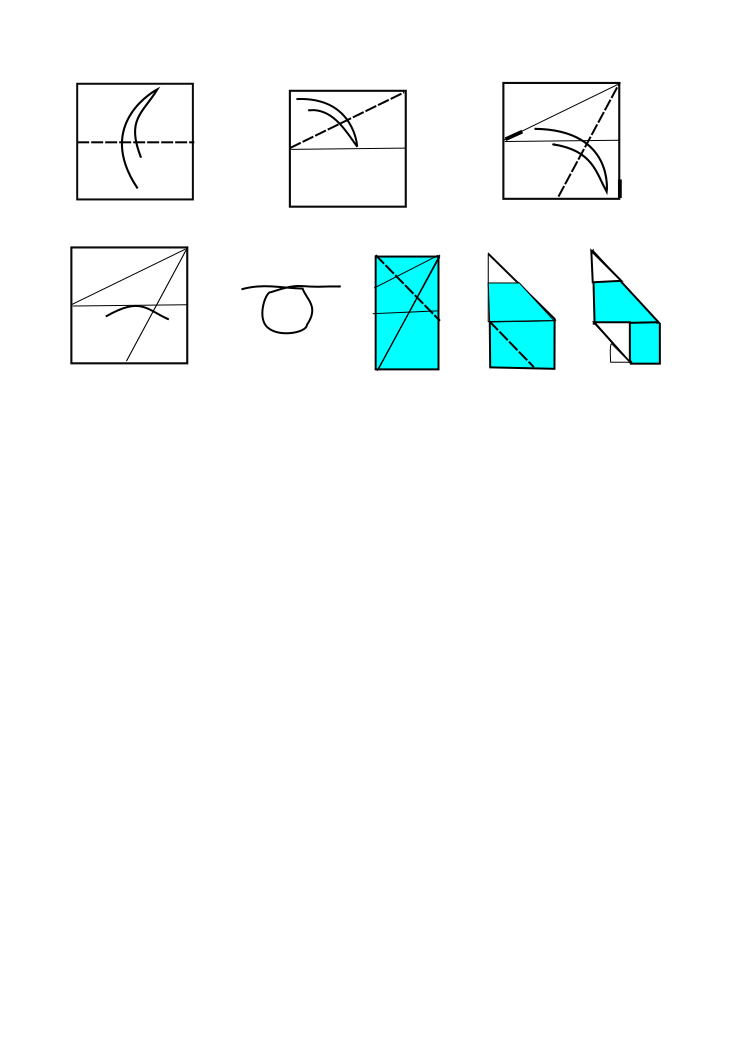
i did these (not quite finished) diagrams on inkscape. PS they are for the modular coaster.
my website http://www.gabrielorigami.com/
-
Dybkjær
- Newbie
- Posts: 11
- Joined: October 19th, 2008, 10:18 pm
- Location: Copenhagen, Denmark
- Contact:
Re: Diagramming
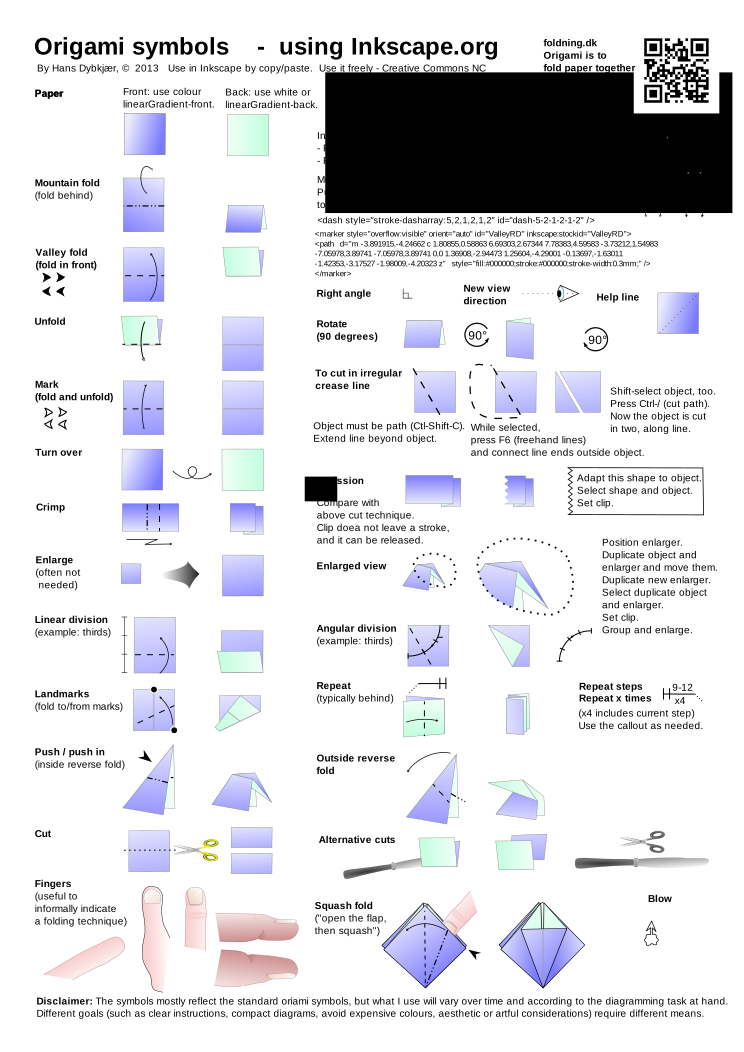
You might find this sheet useful when diagramming in InkScape:
http://papirfoldning.dk/temp/symbols_origami.svg
I've posted the link before, but the document has some updates.
As related to the discussion, it's an example of an SVG document updated on Mac OS 10.7.3 using InkScape 0.48.2.
http://papirfoldning.dk/temp/symbols_origami.svg
I've posted the link before, but the document has some updates.
As related to the discussion, it's an example of an SVG document updated on Mac OS 10.7.3 using InkScape 0.48.2.
Hans Dybkjær
papirfoldning.dk
papirfoldning.dk