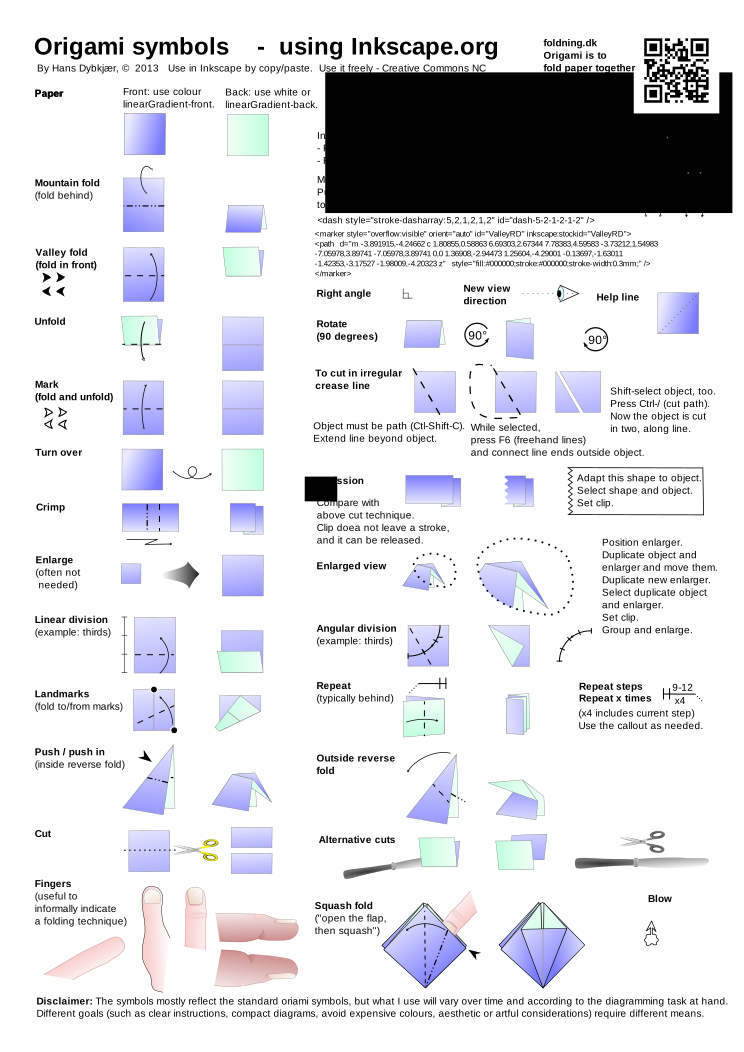
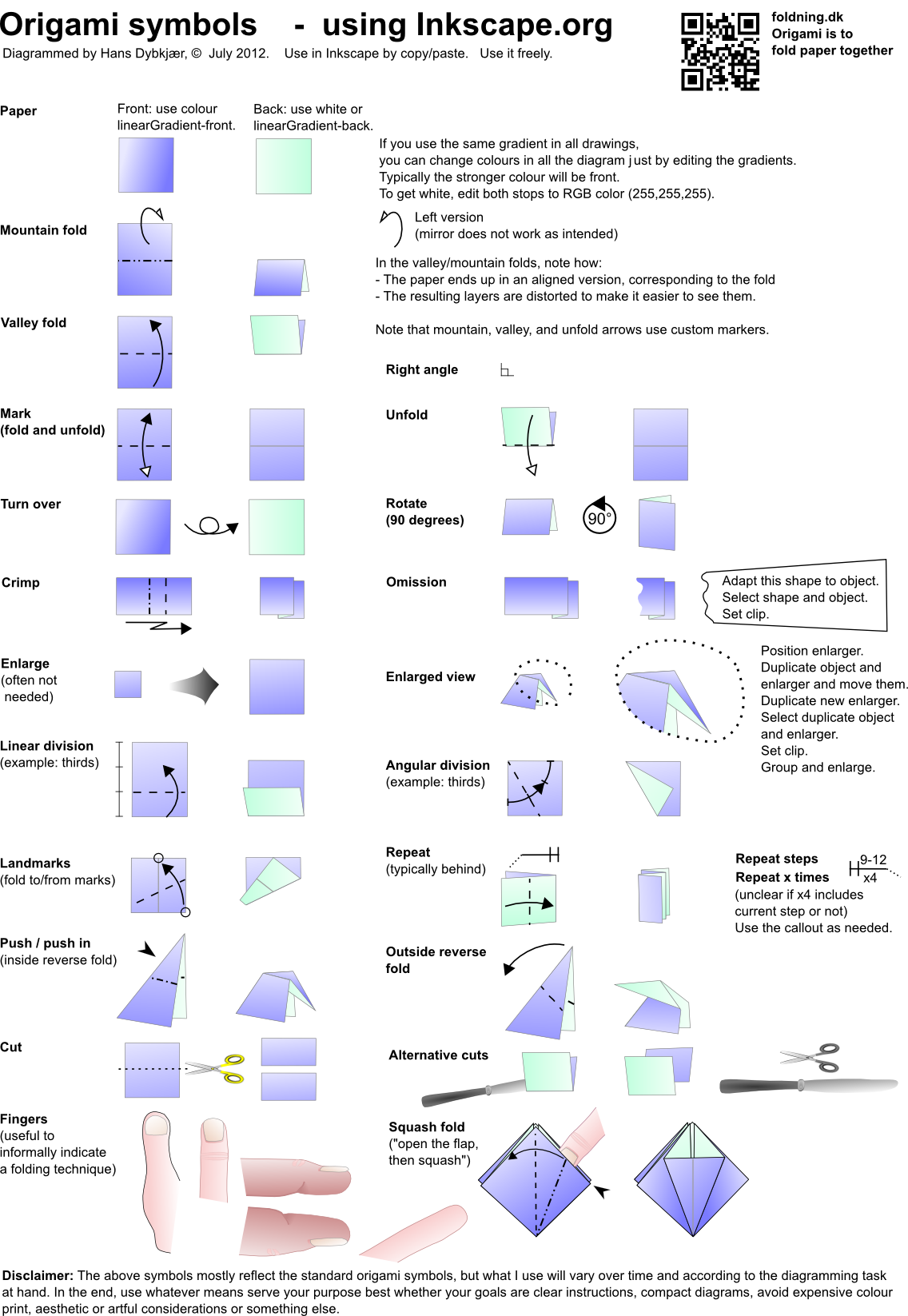
I'm supposed to say something about diagramming and about using Inkscape for this at the BOS Autumn Convention 2-4 September 2011. Hence, and because I find it useful, I've collected a set of symbols I use in my diagramming:
http://papirfoldning.dk/temp/symbols_origami.svg (if for some reason it does not display nicely in your browser, then try http://papirfoldning.dk/temp/symbols_origami.png instead).
You are free to take whatever you find useful from it.
If you have comments, I should be very interested.
More generally, if anybody have pointers to texts on diagramming (philosophy, didactics, drawing techniques, Inkscape, ...), I would be happy to see them. I hope to be able to make my notes public after the convention.
I know of the lists in the 2008-thread "How to diagram your models" in the top of this forum. I know some other sources, but assume I don't.
Best regards,
Hans
Symbol collection in Inkscape
Forum rules
READ: The Origami Forum Rules & Regulations
READ: The Origami Forum Rules & Regulations
-
Dybkjær
- Newbie
- Posts: 11
- Joined: October 19th, 2008, 10:18 pm
- Location: Copenhagen, Denmark
- Contact:
Symbol collection in Inkscape
Hans Dybkjær
papirfoldning.dk
papirfoldning.dk
-
maddoghoek100

- Super Member
- Posts: 137
- Joined: July 6th, 2010, 6:19 am
- Contact:
Re: Symbol collection in Inkscape
was working on a new set of diagrams this weekend and these were a great help. thanks very much
-
Ondrej.Cibulka

- Buddha
- Posts: 1055
- Joined: January 9th, 2006, 4:18 pm
- Location: Czech republic
- Contact:
Re: Symbol collection in Inkscape
The Incspace should have implemented something like styles. If I decide to change colour of one side of the paper I need to change colour in each picture. The possibility of change one colour to another by one click in whole document should be very useful. (and other "style" features)
Ondrej Cibulka Origami, www.origamido.cz
-
Dybkjær
- Newbie
- Posts: 11
- Joined: October 19th, 2008, 10:18 pm
- Location: Copenhagen, Denmark
- Contact:
Re: Symbol collection in Inkscape
Yes, a kind of styles would be nice. If it's the colours, you kan come close by using the same gradient for all backsides and a different for the front sides. In my symbols svg above I call them linearGradient-front and -back. Click on any "paper" object (single, ie. not in a group), press ctrl-shift-F, and press "Edit" in the opening dialog to change the colour of that gradient, and see that the colour changes in all the diagram.
However, I'm still missing a similar thing for other style items, like line thickness and colour.
It is possible via the XML-editor (ctrl-shift-X) to change the arrowhead styles, but be careful to experiment on a copy of your diagram first. That is how I did the mountain-arrowhead, and also the unfold-arrow (the standard open arrow head looks bad if the arrow curves much).
However, I'm still missing a similar thing for other style items, like line thickness and colour.
It is possible via the XML-editor (ctrl-shift-X) to change the arrowhead styles, but be careful to experiment on a copy of your diagram first. That is how I did the mountain-arrowhead, and also the unfold-arrow (the standard open arrow head looks bad if the arrow curves much).
Hans Dybkjær
papirfoldning.dk
papirfoldning.dk